Using HTML 'text' Input Fields
Q
How To Use "text" Input Fields?
✍: FYIcenter.com
A
 A "text" input field is defined as <input type="text" .../>.
A "test" input field can be used to create input field to allow viewers to
enter text strings or numbers.
There are other attributes you may need to use for a "text" input field:
A "text" input field is defined as <input type="text" .../>.
A "test" input field can be used to create input field to allow viewers to
enter text strings or numbers.
There are other attributes you may need to use for a "text" input field:
- name="fieldName" - Specifies the name of this field.
- value="defaultValue" - Specifies a default value for this field.
- size="number" - Specifies the size of the input box in number of characters.
- maxlength="number" - Specifies the maximum length of the input data.
Here is a tutorial example with two text input fields:
<?xml version="1.0" ?>
<!DOCTYPE html PUBLIC "-//W3C//DTD XHTML 1.0 Strict//EN"
  "http://www.w3.org/TR/xhtml1/DTD/xhtml1-strict.dtd">
<html>
 <head>
  <title>Text Input Fields</title>
 </head>
 <body>
  <h4>Online Survey</h4>
  <form action="/survey.php">
  <p style="background-color: #eeeeee; padding: 8px;">
   Your name: <input type="text" name="name"
    value="Joe Miller"/><br/>
   Your email: <input type="text" name="email"
    value="joe@miller.com" size="32" maxlength="60"/><br/>
   <input type="submit" value="Submit"/>
  </p>
  </form>
 </body>
</html>
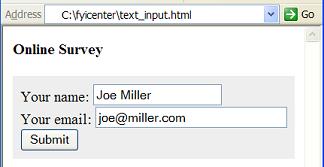
If you save the above document as text_input.html, and view it with Internet Explorer, you will see a form with two text input fields of different sizes as shown below:
⇒ Using HTML 'password' Input Fields
2017-04-19, ∼2652🔥, 0💬
Related Topics:
