Register Azure AD Application in Azure AD B2C
How to register my application as an Azure AD application in my Azure AD B2C account?
✍: FYIcenter.com
 If you want to register an application as an Azure AD application
in your Azure AD B2C account, your application should be:
If you want to register an application as an Azure AD application
in your Azure AD B2C account, your application should be:
- Able to allow users who are members and their identities are managed locally in the Azure AD directory to login.
- Not able to allow users who are members and their identities are managed externally with other identity managers like, Google, Facebook, and Twitter.
Steps to register an application as an Azure AD application in your Azure AD B2C account are:
1. Sign in to the Azure portal with admin permissions.
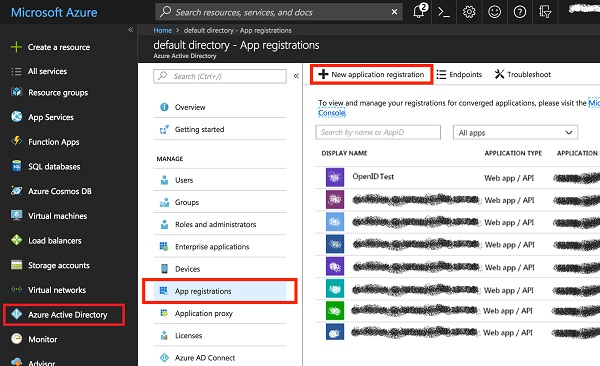
2. Click "Azure Active Directory" from the left menu. And select one directory, if you have multiples.
3. Click "App Registrations" and click "New application registration".
4. Follow the prompts and create a new application. Enter a name like "OpenID Test".
5. Provide the Sign-On URL, which is the URL of your Website like http://dev.fyicenter.com.
6. Once you've completed registration, Azure AD will assign your application a unique client identifier, the Application ID, in UUID format like bd51d56c-e744-4a58-91e1-************.
The following diagram shows you how to register and obtain an application ID from Azure AD service:
⇒ Azure AD Application Integration in Azure AD B2C
2019-03-20, ∼2262🔥, 0💬
Related Topics:
