Register Azure AD B2C Application
How to register my application as an Azure AD B2C application in my Azure AD B2C account?
✍: FYIcenter.com
 If you want to register an application as an Azure AD B2C application
in your Azure AD B2C account, your application should be:
If you want to register an application as an Azure AD B2C application
in your Azure AD B2C account, your application should be:
- Able to allow users who are members and their identities are managed locally in the Azure AD directory to login.
- Able to allow users who are members and their identities are managed externally with other identity managers like, Google, Facebook, and Twitter.
- Able to define end user integration flows for sign-up, sign-in, profile editing, and password resetting.
Steps to register an application as an Azure AD B2C application in your Azure AD B2C account are:
1. Sign in to the Azure portal with admin permissions.
2. Click "All Services" in the left root menu. You see a list of all services.
3. Click "Azure AD B2C" link under the "Identity" section. You see the overview screen of your "Azure AD B2C" service.
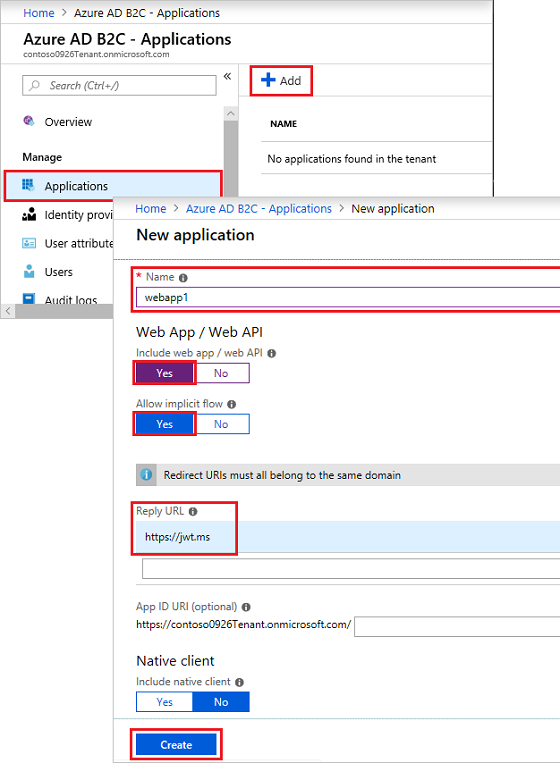
4. Click "Applications" menu. You see a list of registered applications.
5. Click "Add" link above the list. You see the application registration form.
6. Enter a name for the registration like: webapp1 or B2C test
7. Turn on "Web app / Web API" and "Allow implicit flow".
8. Enter one or more Reply URLs like: http://dev.fyicenter.com/openID_receiver.php. This is the URL for your Web server side script to handle the OpenID Connect authentication response.
9. Click "Create".
10. Record the "Application ID", after the registration is done. You need it your OpenID Connect requests.
The following diagram shows you how to register an Azure AD B2C application:
⇒ Requirements to Add External Identity Providers
2019-03-08, ∼2365🔥, 0💬
Related Topics:
