HTML 'em' Tag/Element
Q
What Is an HTML "em" Tag/Element?
✍: FYIcenter.com
A
 An "em" element is an inline element that you can use to
specify text with a normal emphasis.
Here are basic rules about "em" elements:
An "em" element is an inline element that you can use to
specify text with a normal emphasis.
Here are basic rules about "em" elements:
- "em" elements are inline elements.
- "em" elements can not be used at block level.
- Contents of "em" elements will be displayed in italic by most browsers.
- "em" elements will be treated like "i" elements by most browsers.
- "i" elements may not be supported in future versions of XHTML, You should not use "i" elements in your XHTML.
- .
Here is a good example of "em" and "i" elements:
<?xml version="1.0" ?>
<!DOCTYPE html PUBLIC "-//W3C//DTD XHTML 1.0 Strict//EN"
  "http://www.w3.org/TR/xhtml1/DTD/xhtml1-strict.dtd">
<html>
 <head>
  <title>EM and I Elements</title>
 </head>
 <body>
  <p>All <em>programmers</em> are playwrights
  and all <i>computers</i> are lousy actors.</p>
 </body>
</html>
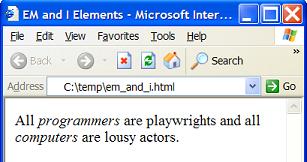
If you save the above document as em_and_i.html, and view it with Internet Explorer, you will see that contents in both "em" and "i" elements are displayed in italic as shown below:
2017-04-28, ∼2996🔥, 0💬
Related Topics:
