Application Registration for Google OpenID
How to register applications for Google OpenID Connect?
✍: FYIcenter.com
 Here are steps to register your application in your Google account.
1. Go to https://console.developers.google.com.
2. Click "Credentials" from the left menu. You see a list of client application projects and their client credentials registered previously.
3. Click "Create credentials > OAuth client ID". You see a list of application types.
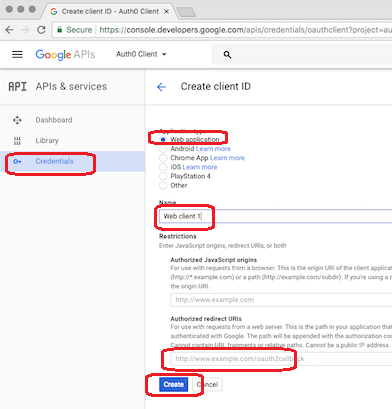
4. Select "Web application" and click "Create".
5. Enter a name for this application registration.
6. Enter an authorized redirect URI, like http://dev.fyicenter.com/openID_receiver.php.
7. Click "Create" button.
8. Record "Client ID" and "Client Secret" generated by Google, after the registration is done.
The following diagram shows you how to register your application for Google OpenID Connect:
⇒ Authentication Flows with Google OpenID Connect
⇐ Requirements for Google OpenID Connect Integration
2021-03-21, ∼2363🔥, 0💬
Related Topics:

