Test API as a Publisher Administrator
How to Test API as a Publisher Administrator?
✍: FYIcenter.com
 You can follow this tutorial to test an API operation as a publisher administrator.
1. Go to https://portal.azure.com with a Web browser. And log in with your company email address.
2. Find the API Management Service resource to open it.
3. Click on the "Developer portal" link near the top. You see the Developer Portal page.
4. Click on the "API" tab and select "First API" created in previous tutorials.
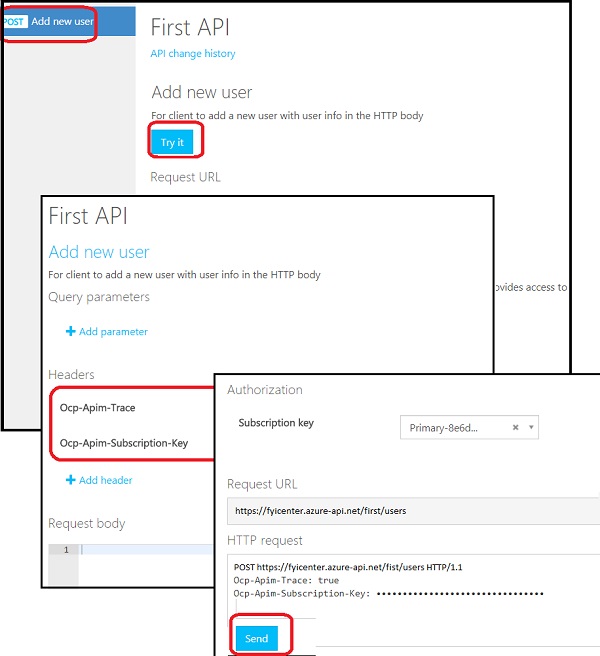
5. Click "POST Add new user" operation on the left. You see the API documentation page.
6. Click the "Try it" button. You see the API test page with the following fields to build the test request:
Query Parameters: None
Headers:
   Ocp-Apim-Trace: true
   Ocp-Apim-Subscription-Key: ***************
Request body: Empty
7. Scroll down, review the request, and click the "Send" button. You see test result displayed.
The picture below shows you steps on how to test API on the Developer Portal as a Publisher:
⇒ Making API More User Friendly
⇐ What Can I See on Developer Portal
2018-03-28, ∼3043🔥, 0💬
Related Topics:
