Install Latest Version of Python for Windows
How to install the latest version of Python on my Windows computer? I have the Python for Windows file downloaded.
✍: FYIcenter.com
 If you have the latest version of Python for Windows downloaded,
you can follow this tutorial to install it:
If you have the latest version of Python for Windows downloaded,
you can follow this tutorial to install it:
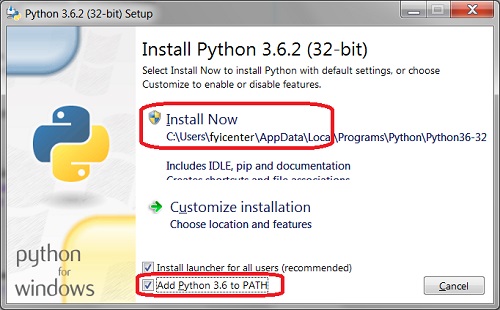
1. Double click the Python download file, for example \fyicenter\python-3.6.2.exe. You see the Python installation screen showing up.
2. Check the "Add Python 3.6 to PATH" option and click "Install Now". You see the installation process started.
3. Wait for the installation to finish.
The latest version of Python is installed now on your Windows computer.
The picture below shows you how to install latest version of Python for Windows:
⇒ Verify Python Installation on Windows
2018-04-12, ∼2545🔥, 0💬
Related Topics:

