Build Implicit Flow with Azure AD v1
How to implement the OpenID Implicit Flow with Azure AD v1.0 service?
✍: FYIcenter.com
 If you want to implement the OpenID Implicit Flow
in your Web application to use Azure AD service,
you should follow these steps:
If you want to implement the OpenID Implicit Flow
in your Web application to use Azure AD service,
you should follow these steps:
1. Building the Azure AD v1.0 Sign-on authentication request:
- Register your Web application to the Azure Active Directory where your end users have login credentials. For example, your company's Active Directory hosted in Azure.
- Add the URL where your server script is located to the above registration as a "Reply URL". This URL will be used as the "redirect_uri" in the authentication request.
- Take the "Application ID" from above registration and use it as the "client_id" in the authentication request.
- Set "scope=openid", "response_type=id_token", and "response_mode=form_post" in the authentication request.
- Set "nonce" to a random number and cache it in your application. So you can use it to validate the response later.
- Set "state" to the current session id of your application, So you can resume the session after the response is validated.
2. Triggering the end user browser to fire the authentication request to https://login.microsoftonline.com/common/oauth2/authorize.
- Create a login page, login.html, to display a login button.
- When the button is click, call a server side script, login.php.
- Create the server side script, login.php, to return a direct HTTP response with the location of https://login.microsoftonline.com/common/oauth2/authorize?... containing all request parameters in the URL as the query string.
3. Letting the end user sign on to the Active Directory - This is controlled by the Azure AD service. Your application is not involved in this step.
4. Validating the authentication response:
- Scan the response body for 4 possible parameters: "id_token", "state", "error", and "error_description" in your server side script, which you provided as the "redirect_uri" in the authentication request.
- Implement some logic to analyze the error and display some error message page back to the end user, if "error" found.
- Verify "state" value, it must be a valid session id in your application. Otherwise, display some error message page back to the end user.
- Decode "id_token" and perform validation. See next tutorial on how to validate "id_token".
4. Letting the end user to use your application:
- Take the user name, email address, and other profile information decoded from the "id_token" as trusted information.
- Record or update the end user profile in your application, if you maintain user profile in database.
- Let the end user to use your application.
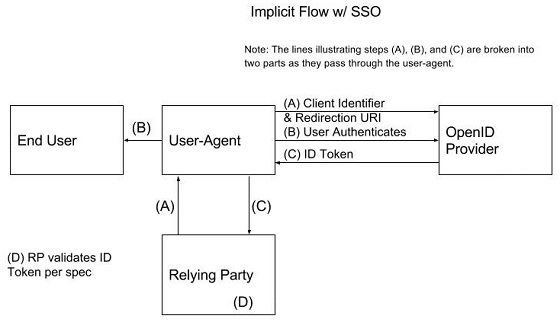
Here is a diagram from "When To Use Which (OAuth2) Grants and (OIDC) Flows" by Robert Broeckelmann that illustrates nicely about the OpenID Implicit Flow.
2021-05-16, ∼2630🔥, 0💬
Related Topics:

