3Pigs5-3.0.epub - Title Page and TOC
How to add a title page and a table of content page to my EPUB book?
✍: FYIcenter.com
 If you want to add a title page and a table of content page to your EPUB 3.1 book,
you can follow this tutorial.
If you want to add a title page and a table of content page to your EPUB 3.1 book,
you can follow this tutorial.
1. Create a title page in an XHTML file like Title-Page.xhtml:
<?xml version="1.0" encoding="utf-8"?>
<html xmlns="http://www.w3.org/1999/xhtml">
  <head>
    <title>The Title Page</title>
  </head>
  <body>
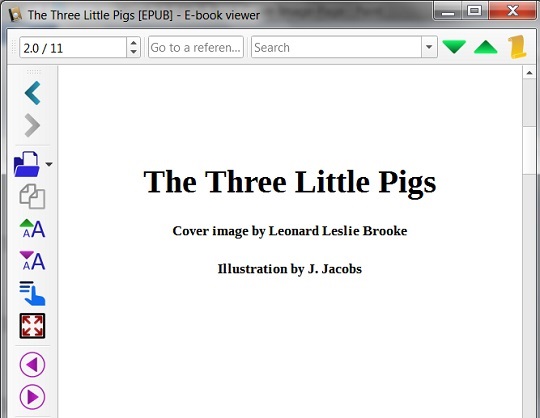
<h1 style="margin-top: 100px; text-align: center">The Three Little Pigs</h1>
<h5 style="text-align: center">Cover image by Leonard Leslie Brooke</h5>
<h5 style="text-align: center">Illustration by J. Jacobs</h5>
  </body>
</html>
2. Create a Table of Contents (TOC) page, Table-of-Contents.xhtml:
<?xml version="1.0" encoding="utf-8"?>
<html xmlns="http://www.w3.org/1999/xhtml">
  <head>
    <title>Table of Contents</title>
  </head>
  <body>
    <h3>Table of Contents</h3>
    <ul>
      <li><a href="/The-Opening.xhtml">The Opening</a>
      </li>
      <li><a href="/First-Pig.xhtml">The First Pig</a>
      </li>
      <li><a href="/Second-Pig.xhtml">The Second Pig</a>
      </li>
      <li><a href="/Third-Pig.xhtml">The Third Pig</a>
      </li>
    </ul>
  </body>
</html>
3. Add a Copyright page if you want to.
4. Add Title-Page.xhtml, Table-of-Contents.xhtml and Copyright.xhtml pages to package.opf:
  <manifest>
    <item id="Cover" href="/The-Wolf-Blows-Down-the-Straw-House.jpg"
      media-type="image/jpeg" properties="cover-image"/>
    <item id="Navigation" href="/navigation.xhtml"
      media-type="application/xhtml+xml" properties="nav"/>
    <item id="Cover-Page" href="/Cover-Page.xhtml" media-type="application/xhtml+xml"/>
    <item id="Title-Page" href="/Title-Page.xhtml" media-type="application/xhtml+xml"/>
    <item id="Table-of-Contents" href="/Table-of-Contents.xhtml" media-type="application/xhtml+xml"/>
    <item id="The-Opening" href="/The-Opening.xhtml" media-type="application/xhtml+xml"/>
    <item id="First-Pig" href="/First-Pig.xhtml" media-type="application/xhtml+xml"/>
    <item id="Second-Pig" href="/Second-Pig.xhtml" media-type="application/xhtml+xml"/>
    <item id="Third-Pig" href="/Third-Pig.xhtml" media-type="application/xhtml+xml"/>
    <item id="Copyright" href="/Copyright.xhtml" media-type="application/xhtml+xml"/>
    <item id="Figure-1" href="/The-Three-Little-Pigs-by-J-Jacobs.png" media-type="image/png"/>
  </manifest>
  <spine>
    <itemref idref="Cover-Page"/>
    <itemref idref="Title-Page"/>
    <itemref idref="Table-of-Contents"/>
    <itemref idref="The-Opening"/>
    <itemref idref="First-Pig"/>
    <itemref idref="Second-Pig"/>
    <itemref idref="Third-Pig"/>
    <itemref idref="Copyright"/>
  </spine>
Note that you should not include navigation.xhtml in the "spine", because navigation.xhtml is not really part of the book content.
5. Update navigation.xhmlt to include new pages.
6. ZIP all files together to created 3Pigs5-3.0.epub.
Now open 3Pigs5-3.0.epub in Calibre and enjoy reading it:
⇒ 3Pigs6-3.0.epub - XHTML pre Element
⇐ 3Pigs4-3.0.epub - Cover Image and Page
2018-08-14, ∼3350🔥, 0💬
Related Topics:
