Subscribe to RSS Feeds with IE
Q
How to Subscribe to RSS Feeds with IE (Internet Explorer)?
✍: FYIcenter.com
A
 If you want to subscribe to RSS Feeds with IE (Internet Explorer),
you can follow this tutorial:
If you want to subscribe to RSS Feeds with IE (Internet Explorer),
you can follow this tutorial:
1. Launch IE (Internet Explorer) 11.
2. Enter the following in the URL input box and press "Enter":
http://dev.fyicenter.com/rss_xml.php
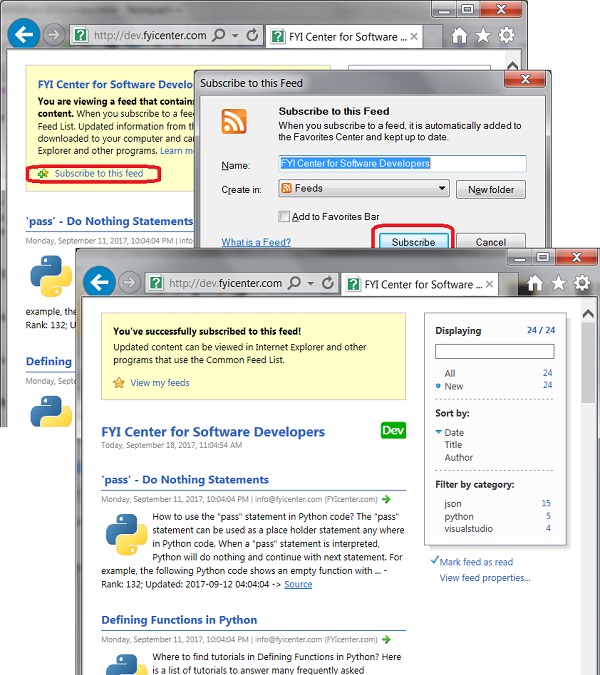
3. Click the "Subscribe to this feed" link near the top. You see a subscription confirmation dialog box.
4. Click the "Subscribe" button. You see the RSS feed displayed in a slightly format.
Once subscribed, IE will keep track of any items you have read.
The picture below shows you how to Subscribe to RSS Feeds with IE:
⇒ Google Chrome Showing RSS Feeds as XML
2023-12-07, ∼2841🔥, 2💬

