Create Visual C# Project in Visual Studio 2017
How to Create a Visual C# Program Project with Visual Studio 2017?
✍: FYIcenter.com
 If you are new to Visual Studio 2017,
you can follow tutorial to create your first Visual C# program project in Visual Studio 2017.
If you are new to Visual Studio 2017,
you can follow tutorial to create your first Visual C# program project in Visual Studio 2017.
1. Start Visual Studio 2017 with .NET development environment.
2. Click "File > New > Project" menu. You see the new project box showing up.
3. Select the project type under "Other Languages > Visual C#" section, like "WPF App (.NET Framework)", and enter project & solution names.
4. Click "OK". You see the visual design screen showing up.
Now you are ready to develop your WPF app in Visual C#.
The picture below shows you how to create a Visual C# project for a WPF App (.NET Framework) application in Visual Studio 2017:
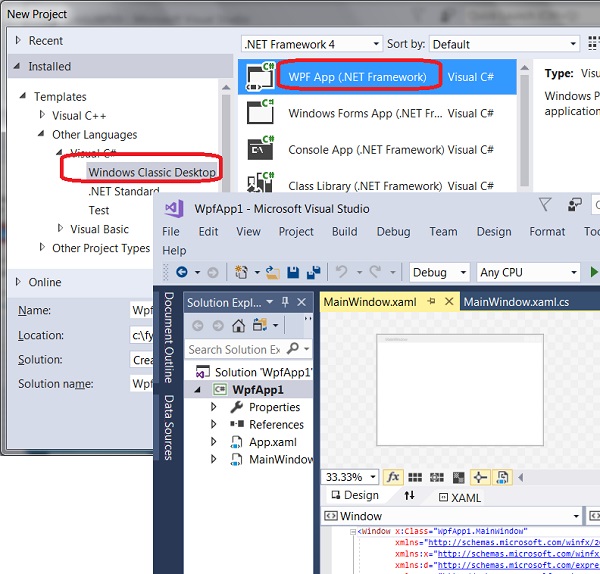
⇒ WPF App with VC# and XAML in Visual Studio 2017
⇐ First Visual C# Program in Visual Studio 2017
2017-08-13, ∼3403🔥, 0💬
Related Topics:

