Reducing the Display Size of an Image in HTML
How To Reduce the Display Size of an Image?
✍: FYIcenter.com
 If an image embedded inline is too big when displayed in a browser, you can
use "width" and "height" attributes to reduce the image's display size.
The display width and height should be proportional to the actual width and height
of the image. Otherwise, the image will be displayed with a distortion.
If an image embedded inline is too big when displayed in a browser, you can
use "width" and "height" attributes to reduce the image's display size.
The display width and height should be proportional to the actual width and height
of the image. Otherwise, the image will be displayed with a distortion.
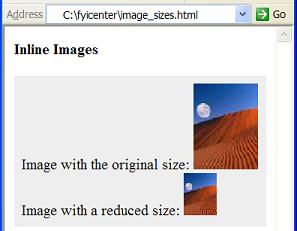
Here is a tutorial example of images with reduced sizes:
<?xml version="1.0" ?>
<!DOCTYPE html PUBLIC "-//W3C//DTD XHTML 1.0 Strict//EN"
  "http://www.w3.org/TR/xhtml1/DTD/xhtml1-strict.dtd">
<html>
 <head>
  <title>Image Sizes</title>
 </head>
 <body>
  <h4>Inline Images</h4>
  <p style="background-color: #eeeeee; padding: 8px;">
   Image with the original size:
   <img src="/moonrise.jpg" alt="Moonrise"
    width="69" height="91"/><br/>
   Image with a reduced size:
   <img src="/moonrise.jpg" alt="Moonrise"
    width="35" height="45"/></p>
 </body>
</html>
If you save the above document as image_sizes.html, and view it with Internet Explorer, you will see that the same image is displayed with two sizes as shown below:
⇒ Floating an Image to the Right Side in HTML
⇐ Attributes of an HTML 'img' Element
2017-03-27, ∼2127🔥, 0💬
Related Topics:
