HTML Line Break 'br' Tag/Element
Q
What Is an HTML "br" Tag/Element?
✍: FYIcenter.com
A
 A "br" element is an inline element that you can use to
specify a line break in the paragraph.
Here are basic rules about "br" elements:
A "br" element is an inline element that you can use to
specify a line break in the paragraph.
Here are basic rules about "br" elements:
- "br" elements are inline elements.
- "br" elements can not be used at block level.
- "br" elements are empty content elements.
- Most browsers will treat "br" elements as line breaks.
Below is a good tutorial example of using "br" elements:
<?xml version="1.0" ?>
<!DOCTYPE html PUBLIC "-//W3C//DTD XHTML 1.0 Strict//EN"
  "http://www.w3.org/TR/xhtml1/DTD/xhtml1-strict.dtd">
<html>
 <head>
  <title>Line Breaks in a Paragraph</title>
 </head>
 <body>
  <p>I love the way you look at me,<br/>
  Your eyes so bright and blue.<br/>
  I love the way you kiss me,<br/>
  Your lips so soft and smooth.</p>
 </body>
</html>
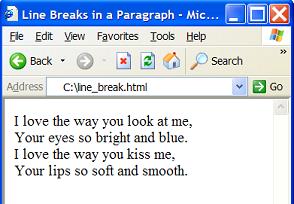
If you save the above document as line_break.html, and view it with Internet Explorer, you will see that the paragraph is broken in multiple lines as shown below:
⇒ HTML 'script' Tag/Element as Inline Element
⇐ HTML 'big' and 'small' Tags/Elements
2017-07-21, ∼2523🔥, 0💬
Related Topics:
