Nested HTML 'blockquote' Elements
Q
Can XHTML "blockquote" Elements Be Nested?
✍: FYIcenter.com
A
 Yes. Blockquote elements can be directly nested.
This allows you to include one quote inside another quote.
Below is a good example of nested blockquote elements:
Yes. Blockquote elements can be directly nested.
This allows you to include one quote inside another quote.
Below is a good example of nested blockquote elements:
<?xml version="1.0" ?>
<!DOCTYPE html PUBLIC "-//W3C//DTD XHTML 1.0 Strict//EN"
  "http://www.w3.org/TR/xhtml1/DTD/xhtml1-strict.dtd">
<html>
 <head>
  <title>Nested BLOCKQUOTE Elements</title>
 </head>
 <body>

 <p>William Shakespeare was an English poet and playwright
 widely regarded as the greatest writer of the English
 language. One of his best-known and most quoted plays is:</p>

 <blockquote>
 <p>Hamlet - The revenge of Prince Hamlet,
 whose father, the late King of Denmark, victor over
 the Polish army, died suddenly while Hamlet was away
 from home at Wittenberg University. The most famous
 quote of the play:</p>

 <blockquote><p>
 "To be or not to be, that is the question."
 </p></blockquote>
 </blockquote>

 </body>
</html>
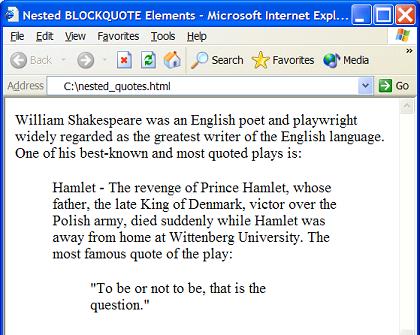
If you save the above document as nest_quotes.html, and view it with Internet Explorer, you will see that nest blockquote elements work nicely giving double extra margins to the inner blockquote element as shown below:
⇒ HTML 'h1' - Heading Tags/Elements
⇐ HTML 'blockquote' Tag/Element
2023-08-03, ∼1981🔥, 0💬
Related Topics:
