Images in HTML 'pre' Elements
Q
Can Images Be Included in "pre" Elements?
✍: FYIcenter.com
A
 Yes. In-line elements can be included pre elements.
So images can be included in pre elements with img elements.
Here is a good example of img elements in pre elements:
Yes. In-line elements can be included pre elements.
So images can be included in pre elements with img elements.
Here is a good example of img elements in pre elements:
<?xml version="1.0" ?>
<!DOCTYPE html PUBLIC "-//W3C//DTD XHTML 1.0 Strict//EN"
  "http://www.w3.org/TR/xhtml1/DTD/xhtml1-strict.dtd">
<html>
 <head>
  <title>The XHTML Validation Icon</title>
 </head>
 <body>
<pre>
If you know your Web page is a valid XHTML document,
you should include this image, <img
src="http://www.w3.org/Icons/valid-xhtml10"
alt="Valid XHTML 1.0 Strict" height="31" width="88" />
on your page to show your readers that
you have taken care to create an interoperable page.
</pre>
 </body>
</html>
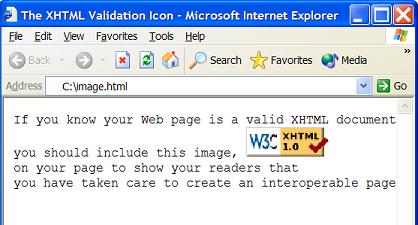
If you save the above document as image.html, and view it with Internet Explorer, you will see that an image is displayed in the pre-formatted text paragraph as shown below:
⇒ HTML 'blockquote' Tag/Element
⇐ Tab Characters in HTML 'pre' Element
2023-08-03, ∼2069🔥, 0💬
Related Topics:
