API Level Policy for All Operations
How to add and view the API level policy for all operations in the API?
✍: FYIcenter.com
 Be default, Azure automatically creates an API level policy for all operation in an API.
You can follow this tutorial to review or add the default API level policy.
Be default, Azure automatically creates an API level policy for all operation in an API.
You can follow this tutorial to review or add the default API level policy.
1. Go to the publisher dashboard of the API Management Service.
2 Click "APIs" from the function list. You see the "Add a new API" screen.
3. Click "First API" from the API list. You see the "All operations" screen.
4. Click the "Edit" icon in the Backend section. You see the backend settings.
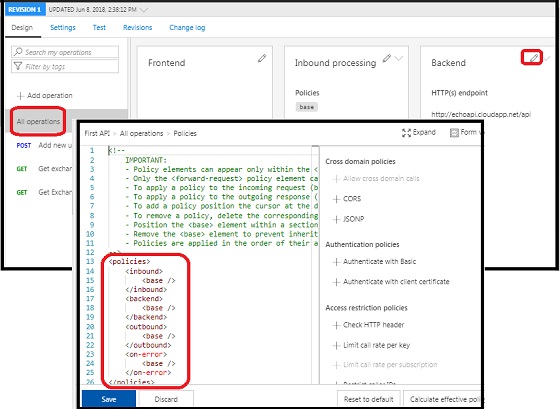
4. Click the "Code view" in the Backend section. You see the default API level policy displayed.
<policies>
    <inbound>
        <base />
    </inbound>
    <backend>
        <base />
    </backend>
    <outbound>
        <base />
    </outbound>
    <on-error>
        <base />
    </on-error>
</policies>
5. Make some changes in the policy, so that the "Save" button is activated.
6. Click the "Save" button to save changes.
The picture below shows you steps on how to edit the API level policy of all operations:
2018-07-22, ∼2701🔥, 0💬
Related Topics:

