3Pigs6-3.1.epub - XHTML pre Element
Q
Does EPUB support XHTML "pre" elements?
✍: FYIcenter.com
A
 Yes. EPUB 3.1 does support XHTML "pre" elements.
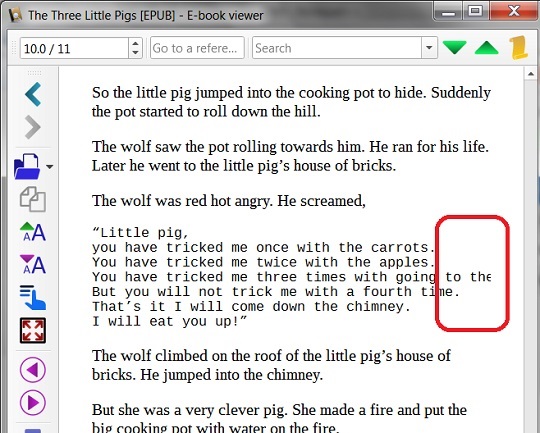
EPUB readers will display "pre" elements with a monospace font. Text lines within "pre" elements will be displayed without wrapping. So if you have long lines in "pre" elements, text will be truncated on the right side.
Let's try this by modifying Third-Pig.xhtml with:
...
<p>The wolf was red hot angry. He screamed,
</p>
<pre>
“Little pig,
you have tricked me once with the carrots.
You have tricked me twice with the apples.
You have tricked me three times with going to the fair.
But you will not trick me with a fourth time.
That’s it I will come down the chimney.
I will eat you up!”
</pre>
...
ZIP all files together to created 3Pigs6-3.1.epub.
Now open 3Pigs6-3.1.epub in Calibre and go to "pre" section.
You see some words are truncated, if the Calibre window is not wide enough:
⇒ 3Pigs7-3.1.epub - Apply CSS File
⇐ 3Pigs5-3.1.epub - Title Page and TOC
2018-12-26, ∼2711🔥, 0💬
Related Topics:
