JSON to XML Conversion at codebeautify.com
Q
How to use the JSON to XML Conversion Tool at codebeautify.com?
✍: FYIcenter.com
A
 If you want to try the JSON to XML Conversion Tool at codebeautify.com,
you can follow this tutorial:
If you want to try the JSON to XML Conversion Tool at codebeautify.com,
you can follow this tutorial:
1. Go to the JSON to XML Conversion Tool page at codebeautify.com.
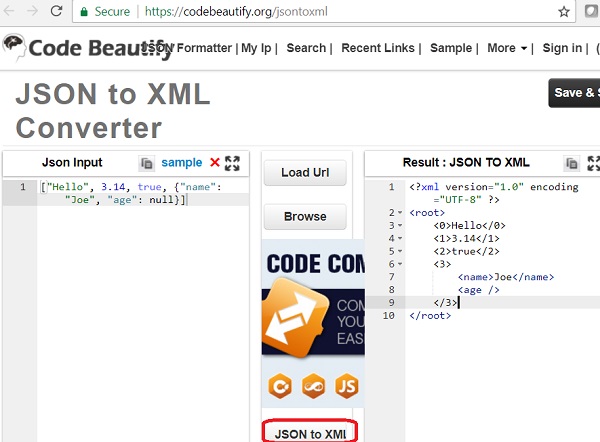
2. Enter the following JSON value in the text area:
["Hello", 3.14, true, {"name": "Joe", "age": null}]
3. Click the "JSON to XML" button to convert it to XML. You see the following output near the bottom:
<root>
  <0>Hello</0>
  <1>3.14</1>
  <2>true</2>
  <3>
    <name>Joe</name>
    <age />
  </3>
</root>
Note that the conversion used some implicit rules:
- A root tag is added as <root>.
- "0", "1", ... are used as the tag name for JSON array element, which are invalid in XML format.
- JSON Null value is converted to an empty text content element.
So the JSON to XML conversion tool at codebeautify.com is not good.
The picture below shows you how to use the online JSON to XML conversion tool at codebeautify.com:
⇒ JSON to XML Conversion at browserling.com
2023-08-25, ∼2912🔥, 0💬
Related Topics:
