JSON to XML Conversion at utilities-online.info
How to use the JSON to XML Conversion Tool at utilities-online.info?
✍: FYIcenter.com
 If you want to try the JSON to XML Conversion Tool at utilities-online.info,
you can follow this tutorial:
If you want to try the JSON to XML Conversion Tool at utilities-online.info,
you can follow this tutorial:
1. Go to the JSON and XML Conversion Tool page at utilities-online.info.
2. Enter the following JSON value in the JSON text area on the right:
["Hello", 3.14, true, {"name": "Joe", "age": null}]
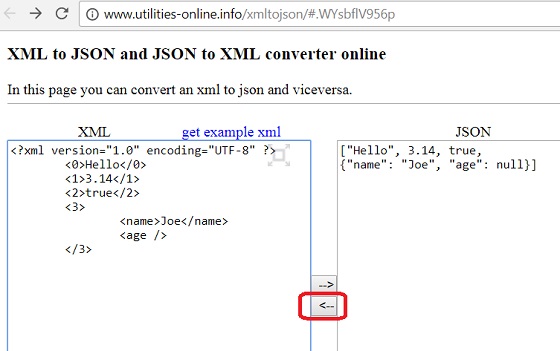
3. Click the left arrow button to convert it to XML. You see the following output in the XML text area on the left:
<?xml version="1.0" encoding="UTF-8" ?>
<0>Hello</0>
<1>3.14</1>
<2>true</2>
<3>
   <name>Joe</name>
   <age/>
</3>
Note that the output XML is actually not a valid XML format:
- Root tag is missing.
- Tag name cannot start with a digit.
So the JSON to XML conversion tool at utilities-online.info is not good.
The picture below shows you how to use the online JSON to XML conversion tool at utilities-online.info:
⇒ JSON to XML Conversion at codebeautify.com
2021-08-04, ∼4190🔥, 1💬
Related Topics:
