Visual Studio Error: Windows SDK Version 8.1 not Found
Why I am getting "The Windows SDK version 8.1 was not found" error, when building my C++ application in with Visual Studio 2017?
✍: FYIcenter.com
 You are getting "The Windows SDK version 8.1 was not found" error,
because you forgot to install Windows SDK version 8.1 on your computer.
You are getting "The Windows SDK version 8.1 was not found" error,
because you forgot to install Windows SDK version 8.1 on your computer.
Here are the steps to reproduce the error:
1. Create a new project and select "Win32 Console Application" type.
2. Click "Build > Build Solution" menu. You see the following compilation error:
1>C:\Program Files (x86)\Microsoft Visual Studio\2017\Community\Common7\IDE
   \VC\VCTargets\Platforms\Win32\PlatformToolsets\v141\Toolset.targets(34,5):
   error MSB8036: The Windows SDK version 8.1 was not found. Install the required
   version of Windows SDK or change the SDK version in the project property
   pages or by right-clicking the solution and selecting "Retarget solution".

1>Done building project "Hello-Project.vcxproj" -- FAILED.
========== Build: 0 succeeded, 1 failed, 0 up-to-date, 0 skipped ==========
The picture below shows you the build error: "MSB8036: The Windows SDK version 8.1 was not found"
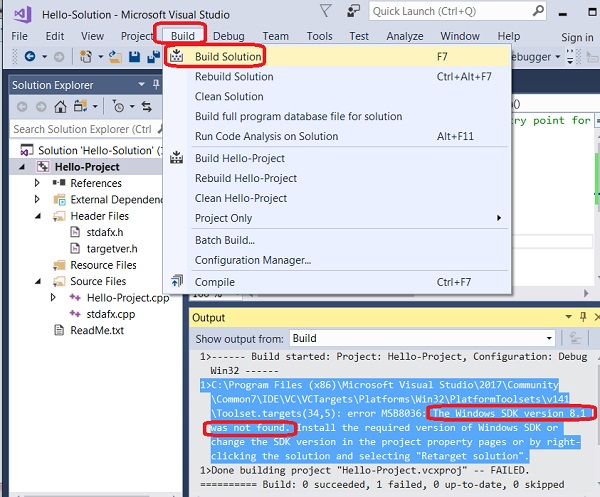
To fix the error, you need to install Windows SDK version 8.1. See the next tutorial.
⇒ Install Windows SDK 8.1 with Visual Studio Installer
⇐ C++ Console Application with Visual Studio 2017
2023-12-01, ∼8649🔥, 0💬
Related Topics:
