Using HTML 'password' Input Fields
How To Use "password" Input Fields?
✍: FYIcenter.com
 A "password" input field is defined as <input type="password" .../>.
A "password" input field can be used to create an input field to allow viewers
to enter text strings or numbers without showing the entered in clear text.
A "password" input field is ideal for password inputting.
There are other attributes you may need to use for a "password" input field:
A "password" input field is defined as <input type="password" .../>.
A "password" input field can be used to create an input field to allow viewers
to enter text strings or numbers without showing the entered in clear text.
A "password" input field is ideal for password inputting.
There are other attributes you may need to use for a "password" input field:
- name="fieldName" - Specifies the name of this field.
- value="defaultValue" - Specifies a default value for this field.
- size="number" - Specifies the size of the input box in number of characters.
- maxlength="number" - Specifies the maximum length of the input data.
Here is a tutorial example with two password input fields:
<?xml version="1.0" ?>
<!DOCTYPE html PUBLIC "-//W3C//DTD XHTML 1.0 Strict//EN"
  "http://www.w3.org/TR/xhtml1/DTD/xhtml1-strict.dtd">
<html>
 <head>
  <title>Password Input Fields</title>
 </head>
 <body>
  <h4>Online Survey</h4>
  <form action="/survey.php">
  <p style="background-color: #eeeeee; padding: 8px;">
   Your password: <input type="password" name="pword"
    value="ui6c7g6p"/><br/>
   Password again: <input type="password" name="pword2"
    value="ui6c7g6p" size="12" maxlength="12"/><br/>
   <input type="submit" value="Submit"/>
  </p>
  </form>
 </body>
</html>
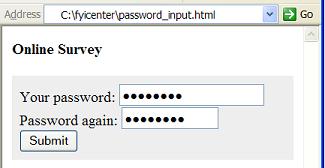
If you save the above document as password_input.html, and view it with Internet Explorer, you will see a form with two password input fields of different sizes as shown below:
⇒ Using HTML 'checkbox' Input Fields
2017-04-15, ∼2963🔥, 0💬
Related Topics:
