Setup Policy to Azure API Operations - 2017 Version
What are steps to set up policy to an Azure API Operation 2017 version?
✍: FYIcenter.com
 If you want to add policy statements to be executed between the Azure API and the backend service,
you need to setup policy to the Azure API operation as shown in this tutorial:
If you want to add policy statements to be executed between the Azure API and the backend service,
you need to setup policy to the Azure API operation as shown in this tutorial:
1. Login to Azure Portal.
2. Go to API Management Services and select your service.
3. Click on Publisher Portal.
4. Click Policies on the left.
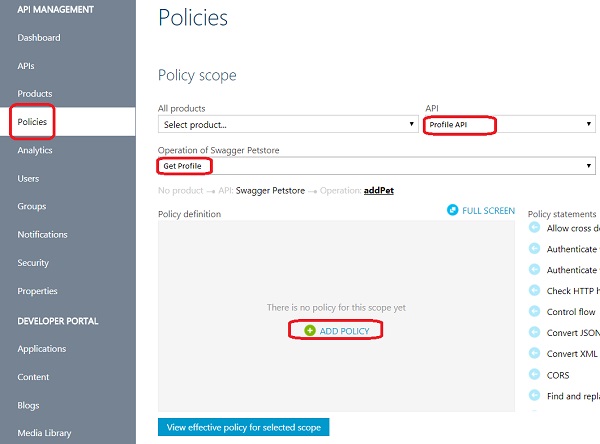
5. Select the API service and the API operation from dropdown lists. You see the "ADD POLICY" link in the policy statements area, if there is no policy created to this operation.
6. Click "ADD POLICY" link. You see a default policy XML document showing up.
7. Add policy statements into the policy XML document and save it.
The picture below shows you how to add policy to an Azure API operation:
⇒ Microsoft Azure API Management Tutorials
⇐ Add Request Query String Parameters - 2017 Version
2018-06-12, ∼2345🔥, 0💬
Related Topics:

