Creating HTML Table Borders
Q
How To Create Table Borders?
✍: FYIcenter.com
A
 There are two sets of borders within a table:
- Outer Borders - Borders that around the outer edges of the table.
- Inner Borders - Borders between table cells.
If you want to create table outer borders and inner borders, you can use the "border" attribute, which offers two functions:
- Turning on or off both outer borders and inner borders.
- Setting the thickness in pixels of outer borders.
Here are some examples of how the "border" attribute can be used:
- <table border="8"> - Turns on both outer and inner borders. It also set outer borders to be 8-pixel thick. The inner border will be always 1-pixel thick.
- <table border="0"> - Turns off both outer and inner borders.
- <table> - Turns off the borders too, because the default is border="0"
Below is a tutorial example of tables with borders:
<?xml version="1.0" ?>
<!DOCTYPE html PUBLIC "-//W3C//DTD XHTML 1.0 Strict//EN"
  "http://www.w3.org/TR/xhtml1/DTD/xhtml1-strict.dtd">
<html>
 <head>
  <title>Table with Borders</title>
 </head>
 <body>
  <h4>Online Order</h4>
  <table border="8">
<tr><td>Description</td><td>Qty</td><td>Price</td></tr>
<tr><td>Email Account</td><td>10</td><td>$9.90</td></tr>
<tr><td>FYIcenter.com Ad</td><td>1</td><td>$99.00</td></tr>
<tr><td>1-year Access</td><td>1</td><td>$199.00</td></tr>
  </table>
 </body>
</html>
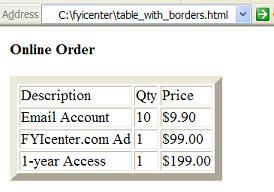
If you save the above document as table_with_borders.html, and view it with Internet Explorer, you will see that the table is displayed with outer borders and inner borders between the cells as shown below:
⇒ 'frame' - Controlling HTML Table Borders
2017-05-13, ∼3051🔥, 0💬
Related Topics:
