Defining an HTML Hyper Link
Q
How To Define a Hyper Link?
✍: FYIcenter.com
A
 If you want to define a hyper link in your HTML document,
you need to use an "a" element with the "href" attribute.
Here are basic rules about defining a hyper link with "a" element:
If you want to define a hyper link in your HTML document,
you need to use an "a" element with the "href" attribute.
Here are basic rules about defining a hyper link with "a" element:
- An "a" element with the "href" attribute defines a hyper link.
- The "href" attribute is used to specify a URL representing the linked resource.
- The content of the "a" element should not be empty.
- The content of the "a" element will be highlighted by most browsers to allow viewers to click the hyper link to retrieve the linked resource.
Here is a good tutorial example of hyper link elements:
<?xml version="1.0" ?>
<!DOCTYPE html PUBLIC "-//W3C//DTD XHTML 1.0 Strict//EN"
  "http://www.w3.org/TR/xhtml1/DTD/xhtml1-strict.dtd">
<html>
 <head>
  <title>Hyper Link Elements</title>
 </head>
 <body>
  <p>"The weak can never forgive.
  Forgiveness is the attribute of the strong."
  <a href="http://en.wikiquote.org/wiki/Mahatma_Gandhi"
   >Click here</a> to find out the author
  of this quote.</p>
 </body>
</html>
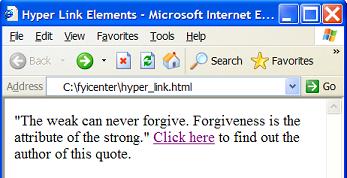
If you save the above document as hyper_link.html, and view it with Internet Explorer, you will see that a hyper link is showing up in the paragraph. The hyper link text is "Click here" displayed in different color with an underline as shown below:
2017-07-15, ∼2596🔥, 0💬
Related Topics:
